
HOW TO SET UP A CRYPTO DONATION PAGE IN 5 MINUTES
Accept crypto donations for your project, cause, or content. Set funding goals and let supporters track progress in real-time with GIB Pro.

Why Crypto Donations?
Traditional donation platforms take 3-8% in fees. Payment processors add more. By the time your supporter's $100 reaches you, you might only see $90.
Crypto donations are different:
- Near-zero fees: A few cents, regardless of amount
- No middlemen: Funds go directly to your wallet
- Global: Anyone, anywhere can donate
- Transparent: Supporters can verify donations on-chain
Whether you're funding an open source project, accepting tips for content, or raising money for a cause, crypto donations just make sense.
The Problem with Most Crypto Donations
The typical approach is to paste a wallet address in your bio or create a simple page with addresses. But this has problems:
No context: Why are you raising funds? What's the goal?
No progress tracking: Supporters have no idea if you're at 10% or 90% of your goal.
No social proof: New visitors can't see that others have already contributed.
Multiple addresses = confusion: If you accept BTC, ETH, and SOL, that's three addresses to manage and display. And without QR codes, people have to copy long addresses manually.
A Better Way: Funding Goals
GIB Pro's funding goals solve all of these problems.
You create a goal with:
- A title (what you're funding)
- A description (why it matters)
- A target amount
- A wallet address to receive funds
- An optional deadline
Visitors see:
- Your goal and description
- A progress bar showing how much has been raised
- The wallet address with a QR code for easy sending
- Real-time updates as donations come in
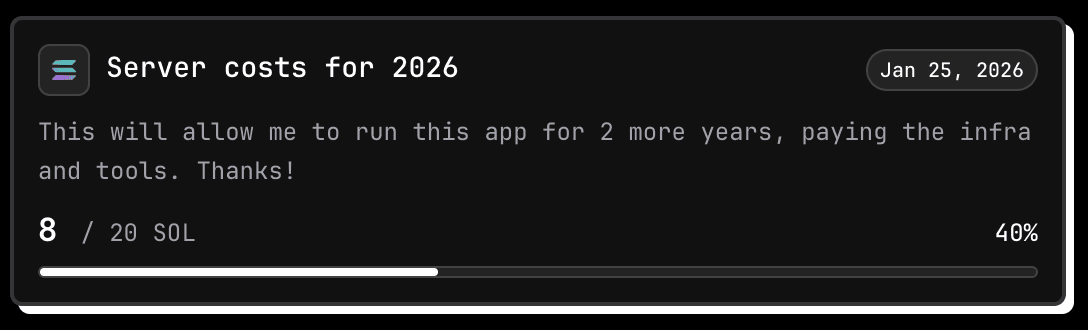
Note: Funding goals are a GIB Pro feature ($9/month). You'll need to upgrade from the free plan to use them.
Step-by-Step Setup
Step 1: Create Your GIB Page and Upgrade to Pro
If you haven't already, claim your username at gib.page. Then go to Dashboard > Settings and upgrade to Pro ($9/month or $90/year).
Need help getting started? See our complete getting started guide.
Step 2: Add Your Wallet
Go to Dashboard > Wallets and add the wallet address where you want to receive donations.
Funding goals currently support balance tracking on these chains:
- Ethereum (ETH)
- Solana (SOL)
- Bitcoin (BTC)
- Base
- Polygon
- Arbitrum
- Optimism
Step 3: Create a Funding Goal
Go to Donation Goals and click "Add Goal."
Fill in:
Title: Keep it clear and specific.
- Good: "Server costs for 2025"
- Good: "Fund my hardware wallet security guide"
- Bad: "Donations"
Description: Explain what the funds will be used for. Be specific. People give more when they know exactly where their money goes.
Target Amount: Set a realistic goal. You can always create a new goal after reaching the first one.
Wallet: Select which wallet should receive donations for this goal.
Deadline (optional): Add urgency if relevant. "Funding closes Jan 31" can motivate action.
Step 4: Share Your Page
Your donation page is now live at gib.page/yourname.
Share it:
- In your Twitter/X bio
- In your Discord server
- On your GitHub README
- In your newsletter
- Anywhere your audience is
How Progress Tracking Works
GIB tracks your funding progress automatically:
- When you create a goal, GIB records your wallet's current balance
- GIB periodically checks the live balance from the blockchain
- Progress = (current balance - starting balance) / target amount
- Visitors see a real-time progress bar
No manual updates needed. The blockchain is the source of truth.
Use Cases for Funding Goals
Open Source Developers
Fund specific features or cover infrastructure costs. Your contributors can see exactly what they're supporting.
Example goals:
- "Add dark mode to the app"
- "Server costs for Q1"
- "Security audit fund"
Content Creators
Accept tips for your content without platform fees eating into your earnings.
Example goals:
- "Support my weekly market analysis"
- "Fund the next tutorial series"
- "Help me upgrade my recording setup"
DAO Contributors
Fund specific initiatives or proposals transparently.
Example goals:
- "Community event fund"
- "Governance improvement grant"
- "Marketing campaign"
Causes and Charity
Raise funds for specific causes with full transparency.
Example goals:
- "Emergency relief fund"
- "Education scholarship"
- "Community project"
Tips for Successful Funding Goals
1. Be Specific
"Support my work" is vague. "Fund 10 tutorial videos on DeFi security" is specific. Specific goals convert better.
2. Set Achievable Targets
A goal that's 80% funded feels exciting. A goal that's 2% funded feels dead. Start with smaller, achievable targets and create new goals as you hit them.
3. Update Regularly
When you hit milestones, share updates. When you complete a goal, thank your supporters publicly. This builds trust for future goals.
4. Make It Easy to Share
Your supporters are your best promoters. Give them something to share:
- "We're 75% to our goal! Help us get there: gib.page/yourname"
- Screenshot the progress bar and share on Twitter
Tracking and Transparency
One of the biggest advantages of crypto donations is transparency.
Every donation is recorded on the blockchain. Supporters can verify:
- That donations actually went to the stated address
- The total amount raised
- When donations were made
GIB pulls data from the blockchain to show real-time progress. No manual updates needed.
Combine with Other Pro Features
Your funding goals work even better when combined with GIB Pro's other features:
- Wallet addresses with QR codes - Make it easy for supporters to send funds
- Organized referral links - Monetize in multiple ways
- Unlimited social links - Connect all your profiles
- Advanced analytics - See where your supporters come from
- Custom themes - Make your page stand out
See how GIB compares to traditional link tools in our Linktree vs GIB comparison.
FAQ
How does GIB track donation progress?
GIB queries public blockchain data to check wallet balances. When you create a goal, we record the starting balance. Progress is calculated as the difference between current and starting balance, divided by your target. All data is public on-chain - we just make it easy to display.
What chains are supported for funding goals?
Funding goals with live balance tracking work on: Ethereum, Solana, Bitcoin, Base, Polygon, Arbitrum, and Optimism.
Are there any fees on donations?
GIB doesn't charge fees on donations. The only fees are the standard blockchain transaction fees (usually a few cents) paid by the sender.
Can I have multiple funding goals?
Yes. Create as many goals as you need. Some users have separate goals for different projects.
What happens when I reach my goal?
The funds are already in your wallet - GIB never holds your money. You can hide completed goals and create new ones.
Is this feature included in the free plan?
No, funding goals are a Pro feature. Pro costs $9/month or $90/year. Free users can still share wallet addresses with QR codes, but won't have goal tracking with progress bars.
Do I need to report donations for taxes?
Probably yes, depending on your jurisdiction. We recommend consulting a tax professional.
Getting Started
Ready to set up your donation page?
- Create your GIB account at gib.page
- Upgrade to Pro ($9/month)
- Add your wallet addresses
- Create your first funding goal
- Share your page
The whole process takes about 5 minutes.
And unlike traditional donation platforms, you keep 100% of what's donated (minus minimal blockchain transaction fees).
Your supporters want to help. Make it easy for them.
Written by

READY TO BUILD YOUR WEB3 PROFILE?
Create your gib.page in minutes. Share all your wallets, referrals, and socials in one link.
Only lowercase letters, numbers, hyphens, and underscores are allowed
Free forever. No credit card required.