
QR CODES FOR CRYPTO WALLETS: WHY THEY MATTER AND HOW TO USE THEM
Stop making people copy 42-character addresses. Learn why QR codes are essential for crypto payments and how to set them up.

The Problem with Wallet Addresses
You're at a crypto conference. Someone wants to send you ETH. You have two options:
Option A: Tell them your address
"It's 0x742d35Cc6634C0532925a3b844Bc9e7595f..."
"Wait, was that a 3 or an 8?"
"Start over..."
Option B: Text it to them
You fumble with your phone, find the address, copy it, open Messages, paste it...
Both options suck. One typo and funds go to the wrong address forever. There's no "oops, undo" on the blockchain.
Why QR Codes Fix This
QR codes solve the address-sharing problem instantly:
No typing errors. Scan and go. The address is encoded exactly right.
Works anywhere. Conferences, meetups, coffee shops, streams, YouTube videos.
Mobile-native. Most crypto wallets have built-in QR scanners. Point, scan, send.
No friction. Takes 2 seconds instead of 2 minutes.
If you're sharing wallet addresses without QR codes, you're making it harder than it needs to be.
How GIB Generates QR Codes
When you add a wallet address to GIB, we automatically generate a QR code for it. No extra steps.
Your visitors can:
- Tap the wallet card on your page
- See the QR code in a modal
- Scan it with their wallet app
- Send funds immediately
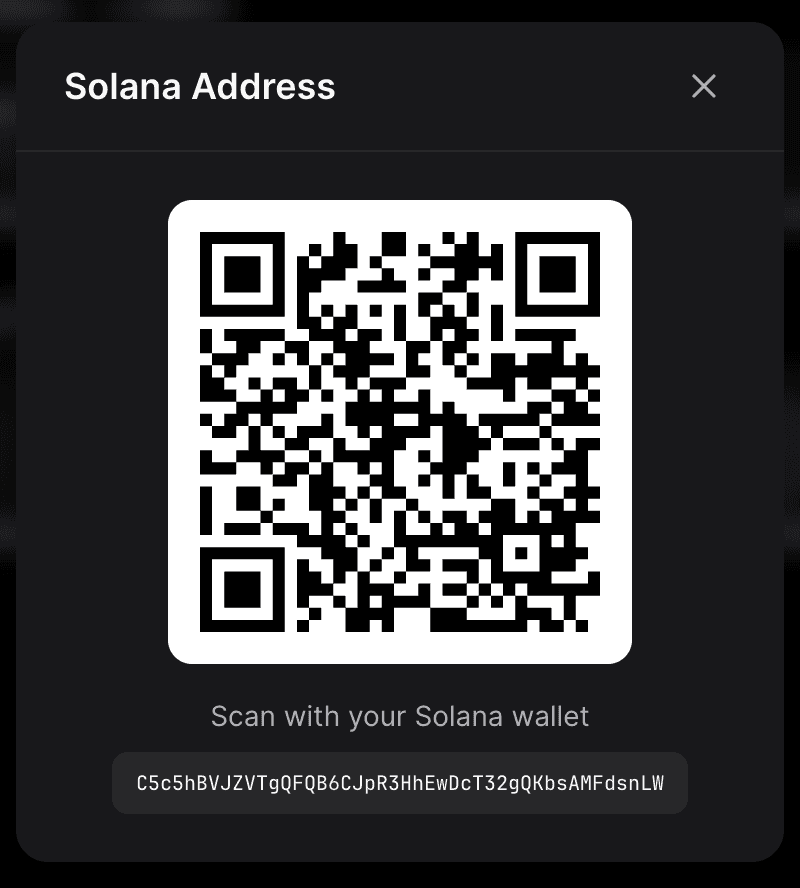
The QR code encodes your wallet address using chain-specific URI formats (like ethereum: or bitcoin:) that work with all major wallets:
- MetaMask
- Rainbow
- Trust Wallet
- Coinbase Wallet
- Phantom (Solana)
- And dozens more
What's Included Free vs Pro
Free plan: 2 wallet addresses (Ethereum and Solana) with auto-generated QR codes
Pro plan ($9/month): Unlimited wallets across 14+ chains including Bitcoin, Polygon, Arbitrum, Optimism, Base, Avalanche, BNB Chain, Litecoin, Dogecoin, Tron, Monero, and USDC
Both plans include QR codes for all your wallets.
Use Cases for Wallet QR Codes
At Conferences and Events
Print your QR code or show it on your phone. People can send you crypto without typing anything.
"Want to tip me? Scan this."
In Your Content
Add your QR code to:
- YouTube video end screens
- Stream overlays
- Presentation slides
- Printed materials
For Donations
Running a fundraiser? Display your QR code so supporters can donate instantly from their phones.
Want progress tracking? GIB Pro's funding goals show a live progress bar.
In Physical Locations
Cafes, stores, or venues accepting crypto can display QR codes at checkout.
"Scan to pay in ETH or SOL"
On Business Cards
Add your GIB page URL as a QR code to your business card. Anyone can scan it to see all your wallets at once.
Setting Up QR Codes on GIB
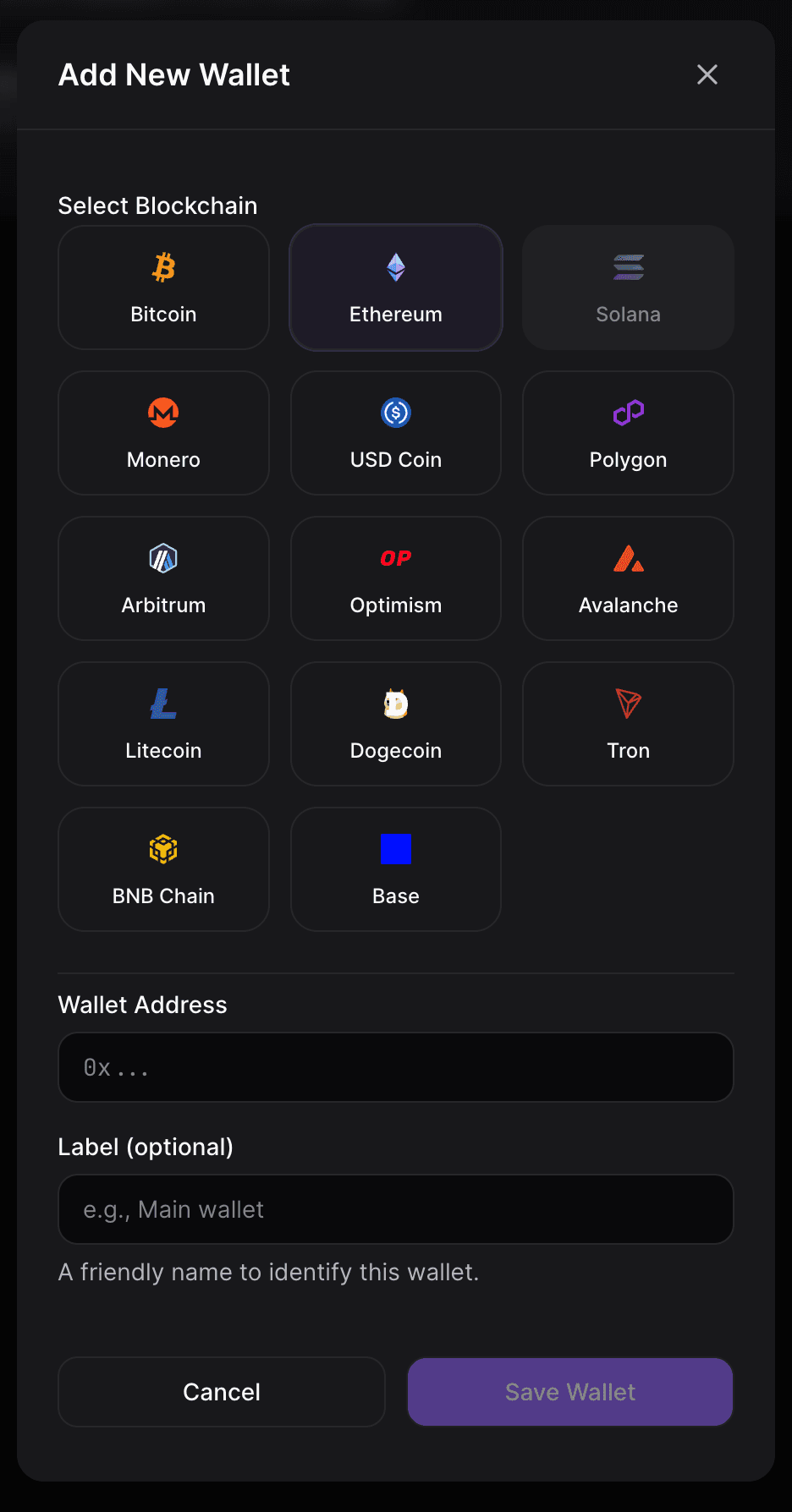
Step 1: Add Your Wallet
Go to Dashboard > Wallets and click Add Wallet.
Enter:
- Chain (free: Ethereum or Solana; Pro: 14+ chains)
- Your wallet address
- Optional label
Step 2: That's It
Seriously. GIB generates the QR code automatically. When visitors tap your wallet card, they see:
- Your full address (copyable)
- The QR code
- Chain icon
No configuration needed.
Step 3: Test It
Open your GIB page on mobile, tap your wallet, and try scanning with your wallet app. Make sure everything works before sharing widely.
QR Code Security Best Practices
Always Verify the Address
Before sending large amounts, verify that the QR code decodes to the correct address. Most wallet apps show a preview before sending.
Use Dedicated Receiving Addresses
If privacy matters, consider using a dedicated address for public-facing QR codes rather than your main wallet.
Check the Chain
Make sure the sender is on the right chain. Sending ETH to a Bitcoin address (or vice versa) will result in lost funds.
Keep Your Private Keys Safe
This should be obvious, but: QR codes share your public address, not your private key. Never share your seed phrase or private key with anyone.
Supported Chains
GIB supports 14+ chains. Here are the most popular:
| Chain | Best For | Plan |
|---|---|---|
| Ethereum (ETH) | DeFi, NFTs, most crypto users | Free |
| Solana (SOL) | Fast, cheap transactions | Free |
| Bitcoin (BTC) | Large transfers, store of value | Pro |
| Polygon (MATIC) | Low fees for Ethereum ecosystem | Pro |
| Base | Coinbase users, cheap ETH transfers | Pro |
| Arbitrum | DeFi users, lower gas fees | Pro |
Each wallet gets its own QR code, formatted correctly for that chain.
Downloading Your QR Code
Need to use your QR code outside of GIB?
- Open your GIB page
- Tap the wallet card
- Right-click the QR code and save
- Use anywhere you need it
Alternatively, screenshot the QR modal for quick sharing.
Why Not Just Use a Standalone QR Generator?
You could use a random QR code generator. But:
No context: A floating QR code means nothing. Visitors need to know which chain it's for.
Maintenance pain: Update your address, and you need to regenerate and replace QR codes everywhere.
Not mobile-optimized: Most QR generators aren't designed for mobile-first crypto use.
With GIB, your QR codes are:
- Always up to date
- Part of a complete profile
- Properly labeled by chain
- Displayed in a mobile-friendly modal
Combining QR Codes with Pro Features
QR codes are just one part of your GIB page. Pro users can also add:
- Funding goals - Track donations toward a target with live progress
- Referral links - Monetize your audience with organized affiliate links
- Unlimited social links - Connect all your profiles
- Custom themes - Make your page stand out with 6 design styles
See how GIB compares to other tools in our Linktree vs GIB comparison.
FAQ
What format are GIB's QR codes?
QR codes that encode the wallet address with chain-specific URI prefixes (like ethereum:0x... or bitcoin:bc1...). Compatible with all wallet apps and QR scanners.
Can I customize the QR code colors?
Not currently. QR codes use high-contrast black and white for maximum scannability.
Do QR codes work for all my wallets?
Yes. Every wallet you add gets a QR code automatically. Free users can add 2 wallets (ETH/SOL), Pro users can add unlimited wallets across 14+ chains.
What if someone scans the QR code with a regular camera app?
They'll see your wallet address as text. They can copy it manually if their wallet app doesn't have a scanner.
Can I add a logo to the QR code?
Not currently. Adding logos can reduce QR code reliability. We prioritize function over style.
How do I share my QR code on social media?
Screenshot it from your GIB page, or share your page URL and let visitors tap to see the QR code.
Get Started
Ready to make your wallet addresses actually usable?
- Create your GIB page
- Add your wallet addresses (2 free, unlimited with Pro)
- Share your page
- Watch the QR code scans roll in
No more dictating addresses. No more copy-paste errors. Just scan and send.
Written by

READY TO BUILD YOUR WEB3 PROFILE?
Create your gib.page in minutes. Share all your wallets, referrals, and socials in one link.
Only lowercase letters, numbers, hyphens, and underscores are allowed
Free forever. No credit card required.