
STOP COPY-PASTING YOUR REFERRAL CODES: THERE'S A BETTER WAY
Your crypto referral codes are scattered across notes, DMs, and bookmarks. Here's how to organize them in one shareable link with GIB Pro.

The Referral Code Chaos
You've got referral codes for everything:
- Binance
- Coinbase
- Bybit
- Kraken
- Ledger
- That DeFi app you tried last month
- Three different wallet apps
And where are they? Scattered across:
- Your notes app (multiple notes, of course)
- Screenshots on your phone
- Bookmarked tabs you never open
- DMs to yourself
- That spreadsheet you started but never finished
Every time someone asks for your Binance referral, you're digging through your phone like it's 2010.
The Real Cost of Disorganized Referrals
It's not just annoying. You're losing money.
Missed opportunities: Someone asks in Discord, "What exchange should I use?" By the time you find your referral link, three other people have already shared theirs.
Expired links: Some referral programs change URLs or codes. You share an old link, it doesn't work, and you lose the referral.
Friction for your audience: You finally find your code and paste it in chat. Now they have to copy it, open a new tab, navigate to the signup page, and paste it in. Half of them don't bother.
The One-Link Solution
What if all your referral codes lived in one place?
One link you could:
- Drop in your bio
- Share in Discord
- Send when someone asks
- Never have to dig through notes again
That's what GIB Pro's referral link feature does. Combined with wallet addresses with QR codes and funding goals, you get a complete Web3 profile.
Note: Referral links are a GIB Pro feature ($9/month). Free users can share wallet addresses with QR codes, but referral link organization requires Pro.
How It Works
Step 1: Upgrade to Pro
Go to gib.page, create your account, and upgrade to Pro ($9/month or $90/year) in Dashboard > Settings.
Step 2: Add Your Referrals
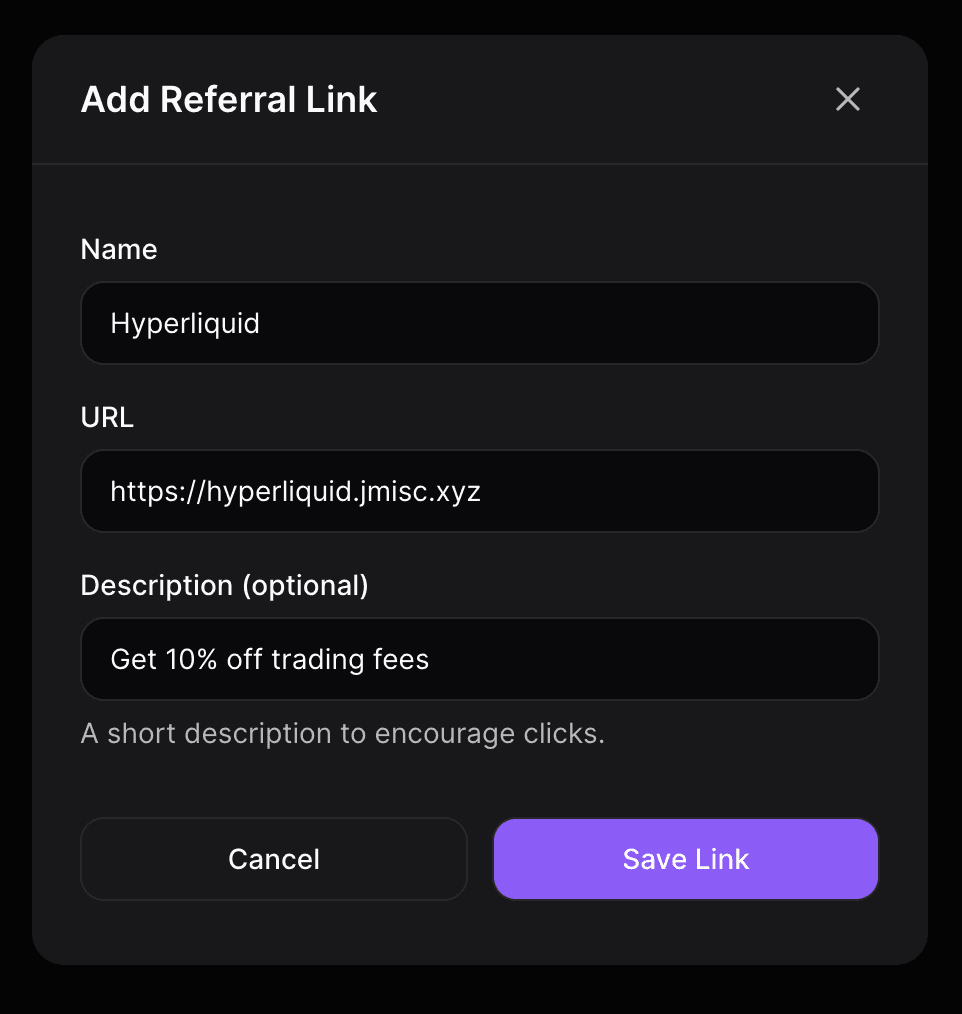
Go to Referrals in your dashboard and add your referral links. For each one, you add:
- The platform name (Binance, Coinbase, etc.)
- Your referral URL or code
- Optional: a short description ("Get 10% off trading fees")
Step 3: Share One Link
Your referrals now live at gib.page/yourname. When someone visits, they see a clean list of all your referral links, organized and clickable.
Step 4: Actually Get Credit
Because it's easy to share and easy for visitors to use, you actually get credit for referrals instead of losing them to friction.
What Referrals Should You Add?
Here's a starter list for crypto creators:
Exchanges:
- Binance
- Coinbase
- Kraken
- Bybit
- OKX
- Crypto.com
Hardware Wallets:
- Ledger
- Trezor
Software Wallets:
- MetaMask (if applicable)
- Phantom
- Rainbow
DeFi Platforms:
- Uniswap
- Aave
- Compound
- Any platform you actively use
Tools:
- Trading bots
- Portfolio trackers
- Tax software (Koinly, CoinTracker)
Other:
- VPNs
- Cloud services
- Any tool your audience uses
Pro Tips for Referral Links
1. Prioritize by Value
Put your highest-value referrals at the top. Exchange referrals often pay the most. Use drag-and-drop to reorder them.
2. Add Context
Use the description field. "Get 20% off fees for 6 months" converts better than just "Binance."
3. Keep Them Updated
Check your referral links quarterly. Programs change, codes expire. One broken link can cost you dozens of referrals.
4. Mention It
Having the links isn't enough. Mention them:
- In your Twitter bio: "My crypto tools: gib.page/yourname"
- When relevant in Discord: "I use Binance, here's my setup: [link]"
- In content: "Full list of tools I use linked in bio"
The Math on Referrals
Let's say you have 10 referral links on your GIB page.
Average referral value: $20 (conservative estimate across platforms)
Visitors per month: 100
Conversion rate: 5%
That's 5 referrals/month x $20 = $100/month in passive income
And that's with modest traffic. Creators with larger audiences earn significantly more.
GIB Pro costs $9/month. If you get even one referral signup per month, it pays for itself.
The difference between earning $0 and $100/month is often just organization. Making your referrals easy to find and easy to use.
Why Not Just Use Linktree?
You could add referral links to Linktree. But:
- They're mixed in with all your other links
- No dedicated section for referrals
- No way to add descriptions or context
- No crypto-specific features (wallets, QR codes)
GIB was built for crypto creators. Referrals are a first-class feature with their own section, descriptions, and click tracking. See our full Linktree vs GIB comparison.
FAQ
How many referral links can I add?
Unlimited. Add as many as you need.
Can I track which referrals get clicked?
Yes. GIB Pro's analytics show you click counts for each referral link so you know what's working.
Do referral links work with URL shorteners?
Yes. Just paste your full referral URL (including any shortener) and it will work.
What if a referral program ends?
Just remove it from your dashboard. Takes 2 seconds. Much better than having broken links scattered across your notes.
Can I reorder my referral links?
Yes. Drag and drop to put your highest-value referrals at the top.
Is this included in the free plan?
No, referral links are a Pro feature. Pro costs $9/month or $90/year. Free users can still share wallet addresses with QR codes.
Get Started
- Create your account at gib.page
- Upgrade to Pro ($9/month)
- Go to Referrals in your dashboard
- Add your top 5-10 referral links
- Share your page
That's it. No more digging through notes. No more missed referrals.
New to GIB? Check out our complete getting started guide.
Your future self (and your wallet) will thank you.
Written by

READY TO BUILD YOUR WEB3 PROFILE?
Create your gib.page in minutes. Share all your wallets, referrals, and socials in one link.
Only lowercase letters, numbers, hyphens, and underscores are allowed
Free forever. No credit card required.